A website often begins with a visual idea rather than a finished layout. A designer might imagine a minimalist homepage, an unusual navigation structure or a product page with a distinctive visual identity. Turning that idea into something others can evaluate takes time. An AI image generator introduces another way to explore these possibilities. It transforms written descriptions and visual references into website design concepts, allowing teams to examine different creative directions before committing to detailed interface development.
Exploring Website Design Ideas Through AI-Generated Visuals
Turn Abstract Design Briefs into Visible Concepts
A website design brief often describes qualities rather than specific visual elements. Terms such as modern, elegant, futuristic or user-friendly communicate an intention, but they do not establish exactly how a page should look. An ai photo generator helps translate these descriptions into visual directions. A designer might describe a luxury fashion homepage with generous white space, editorial typography, muted colours and large product photography. The generated concept provides a visual interpretation that the team can discuss and refine. Another prompt might explore a technology website with dark backgrounds, geometric compositions and striking visual accents. Designers can compare these directions before selecting a consistent identity. This process makes early creative discussions more concrete and gives stakeholders something visual to evaluate instead of relying entirely on written descriptions.
Experiment with Layouts Before Developing the Interface
Website composition involves several connected decisions. Designers need to consider the placement of navigation, headlines, images, promotional sections and calls to action. An AI-generated UI concept offers a way to explore different arrangements during the planning stage. For example, an online portfolio might feature a full-screen visual introduction, while another direction could place project thumbnails directly beneath a compact navigation bar. A product landing page might prioritise a central product image, supporting information or a prominent promotional message. With Kling AI, creators can describe a scene and adjust composition, lighting, colours and visual details through IMAGE 3.0. These capabilities make visual experimentation more flexible. The resulting images provide creative references for designers who will later translate the selected composition into an actual website interface.
Establish a Visual Identity Through Reference Images
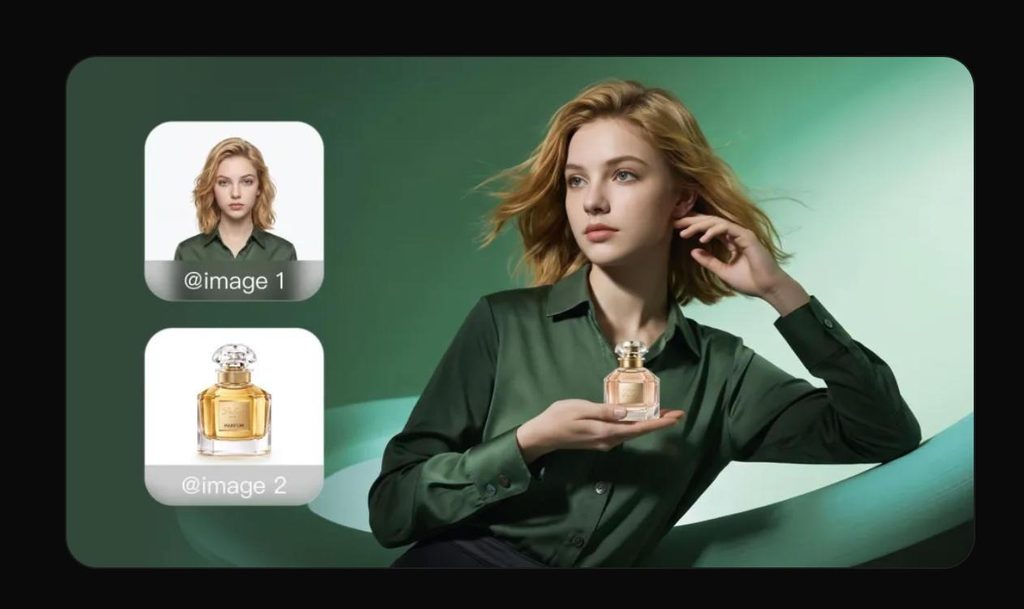
A website needs more than attractive individual screens. Its colours, materials, imagery and overall atmosphere should communicate a recognisable identity. Reference images provide useful guidance when a project already has an established visual direction. Designers might upload a brand colour palette, product photograph, typography reference or existing campaign image. Kling AI supports up to 10 reference images through IMAGE 3.0, bringing their defining visual qualities together in a cohesive result. This creates opportunities to explore how a brand identity might appear across different website sections. For instance, a consistent colour palette and visual style could inform the homepage, product presentation and promotional banners. Instead of treating every screen as an independent design exercise, teams can explore a shared visual language from the beginning.
Turning Generated Concepts into Practical Website Design Resources
Develop Multiple Screens with a Consistent Creative Direction
A convincing website concept usually includes more than one attractive homepage. Visitors move between different sections, and each screen needs to feel connected to the same brand. This makes visual consistency an important part of AI-assisted website design. Kling IMAGE 3.0 Omni supports the creation of professional image series with intentional shot progression, varied framing and a unified creative direction. Its native 4K output also supports detailed visual presentations. Designers could explore a sequence covering a homepage, product overview, campaign landing page and supporting editorial content. Each image can represent a different part of the proposed website while maintaining a shared aesthetic. This approach is particularly useful when preparing creative presentations, discussing a redesign or showing stakeholders how an entire digital experience might develop.
Refine Individual Elements Through Prompt Adjustments
The first generated concept rarely represents every detail of the intended design. A particular project might require a different image position, a more restrained colour palette or a stronger visual focus around its main message. Refinement allows designers to address these details systematically. Rather than rewriting the entire concept, they can adjust specific instructions about composition, lighting, colour and visual style. Kling AI’s image generation workflow supports this type of iterative creative process. Users describe their initial idea, select a suitable model and add references when specific details need to remain recognisable. They can then generate an image and continue refining the result. For website projects, this approach creates room to compare alternative hero sections, promotional compositions and product presentations before the team settles on a preferred visual direction.
Prepare Stronger Creative Presentations for Design Teams
An effective UI concept should communicate an idea clearly to people who may not participate in the design process. Marketing teams, developers, clients and business stakeholders often approach a website from different perspectives. A visual presentation gives everyone a shared reference point. Designers can use generated concepts to explain the intended atmosphere, page composition, imagery and brand expression. A collection of coordinated visuals also makes it easier to present several sections as parts of one proposed experience. Kling AI provides a straightforward creation workflow: users describe their ideas, optionally upload reference images, choose the preferred output settings and generate the result.
Conclusion
AI image generation adds a visual exploration stage to website design. It turns creative briefs into concepts, supports layout experiments and establishes visual consistency across multiple screens. Tools such as Kling AI make this process more accessible through prompt-based creation, reference images and coordinated image series. Generated visuals still serve as design references rather than finished, functional websites. Designers remain responsible for usability, responsive behaviour, navigation and implementation. The real value lies in making website ideas easier to explore, communicate and develop.
Read More: Beyond the Courtroom: What a Law Degree Can Really Do for Your Career

Jhon AJS, the creative mind behind Grammar Update, is an experienced blogger passionate about simplifying English grammar. He focuses on explaining confusing word vs word differences, grammar rules, punctuation, and sentence structure in a clear and practical way. Through easy to understand guides and examples, Jhon helps readers improve their writing and communicate with confidence. With years of blogging experience, he continues to share helpful insights that make learning grammar simple, useful, and accessible for everyone.