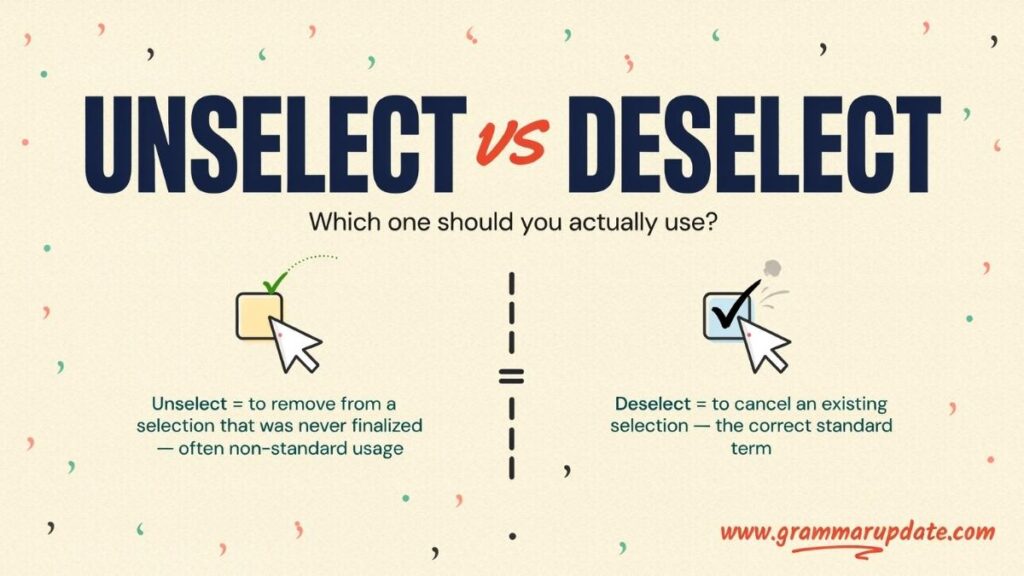
Ever found yourself stuck choosing between unselect vs deselect, staring at your screen as if the software is quietly testing your grammar instead of your patience? This small word pair creates constant confusion in UI design, Excel work, and everyday computing tasks. Both appear to mean the same thing removing a selection but only one is accepted as correct in professional and technical usage. The other often slips in from casual language, leading to clear grammar mistakes and inconsistent documentation. In this guide, we will clear the confusion around unselect vs deselect, fix common usage errors, and explain the correct term so you can avoid mistakes and use confident, accurate language in any digital context.
Unselect vs Deselect Quick Answer
If you need a clear and immediate answer:
- Deselect = Standard, correct, and widely accepted in software and technical writing
- Unselect = Informal, inconsistent, and generally not preferred in professional contexts
Key takeaway:
In computing and UI/UX communication, deselect is the correct industry-standard term.
Quick comparison:
| Feature | Deselect | Unselect |
|---|---|---|
| Professional usage | Standard | Informal |
| Used in Excel | Yes | Rare |
| UI/UX documentation | Yes | Not preferred |
| Technical writing | Yes | Inconsistent |
Fix common more word mistakes in English
Dysregulated vs Disregulated Correct Usage Explained
What Does “Deselect” Mean?
In computing, the deselect meaning in computer systems refers to removing an active selection from a selected object, item, or interface element.
In a software interface, selection represents an active state such as highlighted text, selected files, or checked boxes. Deselecting simply reverses that state.
Core functions of deselect:
- Removing highlighted text or objects
- Clearing selected cells in spreadsheets like Excel
- Unchecking checkboxes in forms
- Cancelling active selections in design tools
Example:
- Click outside the selection area to deselect all items
- Press Esc to deselect active objects in many applications
Table: Deselect in real software environments
| Context | Behavior |
|---|---|
| Microsoft Excel | Deselect cells in a range |
| UI Design Tools | Deselect selected objects |
| Web Interfaces | Deselect checkboxes or filters |
Fix common more word mistakes in English
Honor vs Honour Which Spelling Is Correct?
What Does “Unselect” Mean?
The unselect meaning is similar in intent but weaker in standardization.
It generally means removing or reversing a selection, but it is not consistently defined in professional computing terminology.
Key characteristics:
- Understandable in everyday English usage
- Appears in casual or simplified software interfaces
- Not widely adopted in technical documentation standards
- Often used in user-friendly or beginner-focused apps
Example:
- Tap again to unselect the option
- You can unselect items before submitting
Table: Unselect usage in practice
| Context | Usage Level |
|---|---|
| Mobile apps | Common |
| Technical documentation | Rare |
| UI/UX standards | Not preferred |
Learn how to use confusing more words correctly
Speach vs Speech Which Spelling Is Correct in English?
Unselect vs Deselect What’s the Real Difference?
The difference between unselect and deselect is not about meaning it is about standardization, consistency, and professional usage.
Both words refer to:
- removing a selection
- canceling a selected state
- reversing a user action
However, only one is accepted as a formal UI/UX command term.
Key differences:
- Deselect is part of standardized computing vocabulary
- Unselect is informal and inconsistently used across platforms
Example comparison:
- Select all items, then deselect the unnecessary ones
- Select all items, then unselect the unnecessary ones (less formal usage)
Learn how to use confusing more words correctly
Inclosed vs Enclosed Which Spelling Is Correct?
Why Do Software Systems Use “Deselect” Instead of “Unselect”?
The preference for deselect is rooted in consistency and industry-wide standards.
1. Standard command structure
Software interfaces rely on structured verbs:
- select
- deselect
- activate
- deactivate
- enable
- disable
This structure ensures predictable user interaction.
2. Technical writing consistency
Professional documentation follows strict terminology rules to maintain clarity across systems.
- Microsoft Excel documentation uses “deselect cells”
- UI/UX guidelines use “deselect object”
- Operating systems use “deselect all”
3. Linguistic formation
“Deselect” follows a logical construction:
de- (reverse action) + select = remove selection
This aligns with other computing verbs like disconnect or deactivate.
Learn the difference between tricky more English words
Seperate vs Separate Which Spelling Is Correct?
Examples of “Deselect” in Sentences
- Click outside the area to deselect all items
- Use Ctrl + A, then deselect specific cells in Excel
- Right-click and choose “Deselect All” from the menu
- The system automatically deselects previously selected objects
Table: Deselect usage overview
| Scenario | Example |
|---|---|
| Excel | Deselect selected rows |
| UI Design | Deselect object |
| Browser | Deselect highlighted text |
Examples of “Unselect” in Sentences
- Tap again to unselect the checkbox
- The app allows users to unselect filters
- Users can unselect items before submitting
Table: Unselect usage status
| Context | Acceptability |
|---|---|
| Casual UI apps | Acceptable |
| Technical writing | Not recommended |
| Professional software | Avoided |
Learn the difference between tricky more English words
Verbiage vs Verbage Which Spelling Is Correct?
Common Mistakes with Unselect vs Deselect
Many users and writers incorrectly treat both terms as equal.
Mistake 1: Assuming both are interchangeable
They are not equivalent in professional documentation.
- Deselect = standard
- Unselect = informal
Mistake 2: Using “unselect” in technical documents
This reduces clarity and breaks consistency in UI language.
Example:
- Incorrect: Unselect all items
- Correct: Deselect all items
Is “Unselect” a Real Word?
Yes, but with limitations.
- It is understandable in everyday English
- It appears in informal digital contexts
- It is not widely recognized in technical writing standards
- Many dictionaries treat it as non-standard or absent in computing usage
Table: Word recognition status
| Term | Dictionary Recognition |
|---|---|
| deselect | Standard computing term |
| unselect | Informal / limited usage |
Learn the difference between tricky more English words
Neighbour vs Neighbor Which Spelling Is Correct?
American vs British English Usage
Unlike spelling variations such as color/colour, this is not a regional English difference.
Both American English and British English prefer:
deselect
Reason:
- Computing terminology is globally standardized
- Software UI language is unified across regions
Synonyms and Related Terms
Both terms relate to selection control in software interfaces.
Common related actions:
- clear selection
- remove selection
- uncheck
- cancel selection
- reverse selection
- toggle selection
Table: Selection-related terminology
| Action | Term |
|---|---|
| remove checkbox | uncheck |
| clear selection | deselect |
| reverse selection | toggle |
Learn the difference between tricky more English words
Tieing vs Tying Which Spelling Is Correct in English?
Unselect or Deselect in Software Contexts
Microsoft Excel
In Microsoft Excel, users frequently manage selections:
- select cells
- deselect cells
- clear selection
“Unselect” is not used in official Excel terminology.
UI/UX design tools
Tools like Figma, Adobe XD, and Photoshop consistently use:
- deselect object
- clear selection
Operating systems
Windows and macOS commonly use:
- deselect all
- clear selection
- remove selection
Learn the difference between tricky more English words
Ladel vs Ladle Difference and Usage
Keyboard Shortcuts for Selection Control
There is no universal “deselect all” shortcut, but common interactions include:
- Ctrl + Click → remove selection (Windows)
- Cmd + Click → deselect item (Mac)
- Esc key → cancel active selection
Excel behavior example:
- Ctrl + A → select all
- Ctrl + Click → deselect individual cells
Fix common more word mistakes in English
Conex or Connex Differences Explained
Stack Exchange and Technical Writing Consensus
Across developer communities like Stack Exchange, the conclusion is consistent:
- “Deselect” is preferred
- “Unselect” is not recommended
Reasons include:
- clearer communication
- consistent UI terminology
- alignment with software standards
Fix common more word mistakes in English
Intention vs Intension Which Is Correct?
Practice Session Unselect vs Deselect
Think you have mastered the unselect vs deselect difference? Put your knowledge to the test with these fill-in-the-blank exercises. These sentences reflect real-world usage in software, UI design, Excel, and technical writing.
Fill in the Blanks
- Click outside the object to __________ it.
- In Microsoft Excel, you can __________ a selected cell by holding Ctrl and clicking it again.
- The software allows users to __________ all selected items at once.
- Before selecting a new layer, remember to __________ the current one.
- Press the Esc key to __________ the active selection.
- To remove the checkmark, __________ the checkbox.
- Most technical documentation uses the word __________ rather than unselect.
- The designer forgot to __________ the previously selected object.
- To clear the highlighted text, simply __________ it.
- The menu includes a “__________ All” option.
- Professional UI guidelines recommend using __________ as the standard term.
- The application automatically __________ old selections when a new item is chosen.
- Users can __________ multiple files individually.
- The tutorial explains how to __________ selected rows in Excel.
- Before submitting the form, __________ any unwanted options.
- The command helps users __________ items selected by mistake.
- Many writers incorrectly use unselect when __________ is preferred.
- The software will __________ the object after you click elsewhere.
- To remove the active selection, __________ the highlighted item.
- The editor replaced unselect with __________ throughout the document.
- The checkbox remains active until you __________ it.
- Most software interfaces use __________ instead of unselect.
- The shortcut makes it easy to __________ selected objects.
- In technical writing, __________ is considered the correct industry-standard term.
- To clear your current selection, simply __________ the item.
Answers
| Question | Answer |
|---|---|
| 1 | deselect |
| 2 | deselect |
| 3 | deselect |
| 4 | deselect |
| 5 | deselect |
| 6 | deselect |
| 7 | deselect |
| 8 | deselect |
| 9 | deselect |
| 10 | Deselect |
| 11 | deselect |
| 12 | deselects |
| 13 | deselect |
| 14 | deselect |
| 15 | deselect |
| 16 | deselect |
| 17 | deselect |
| 18 | deselect |
| 19 | deselect |
| 20 | deselect |
| 21 | deselect |
| 22 | deselect |
| 23 | deselect |
| 24 | deselect |
| 25 | deselect |
Here’s a trusted source for clear word meanings:
FAQs
What does deselect mean?
Deselect means to remove an active selection from an item, object, file, cell, checkbox, or piece of text. In computing and user interfaces, it is the action of undoing a selection so that the item is no longer highlighted, chosen, or active.
Is deselect the opposite of select?
Yes. Deselect is the direct opposite of select. Selecting an item makes it active or highlighted, while deselecting removes that active state.
Is deselect a correct word?
Absolutely. Deselect is a correct and widely accepted word in computing, software development, UI/UX design, and technical documentation. It is the standard term used by most software applications and operating systems.
Do you say deselect or unselect?
In professional and technical contexts, deselect is the preferred term. While unselect is sometimes used informally, deselect is the recognized industry standard and the term most commonly found in software interfaces and documentation.
What is the difference between unselect and deselect?
Both words refer to removing a selection, but their usage differs. Deselect is the standard and professionally accepted term, while unselect is less common and generally considered informal. In technical writing and software terminology, deselect is almost always the better choice.
How do you use deselect in a sentence?
Here are a few examples:
- Click outside the image to deselect it.
- Press Esc to deselect the active object.
- Use Ctrl + Click to deselect specific cells in Excel.
These examples show how deselect is commonly used in software and computing environments.
How do you use unselect in a sentence?
Although less common, unselect can appear in informal usage:
- Tap the option again to unselect it.
- Users can unselect filters before applying changes.
However, professional documentation would usually replace unselect with deselect.
What is a synonym for deselect?
Depending on the context, common synonyms include:
- remove selection
- clear selection
- cancel selection
- uncheck
- unmark
- unhighlight
The most suitable synonym depends on what is being deselected.
What is a synonym for unselect?
Common alternatives include:
- deselect
- remove selection
- clear selection
- uncheck
- unmark
Among these options, deselect is the most widely accepted and professional substitute.
How do you deselect something?
The method varies by application, but common ways include:
- Clicking outside the selected item
- Pressing the Esc key
- Using Ctrl + Click or Cmd + Click
- Choosing a Deselect All command from a menu
Most software provides at least one of these methods.
How do you unselect something?
In applications that use the term unselect, you typically remove the selection by clicking the selected item again or using a command that clears the selection. In professional software documentation, this action is usually described as deselecting.
What does “deselect items” mean?
Deselect items means removing the active selection from one or more chosen objects. These items may include files, folders, cells, checkboxes, text, images, or menu options.
How do you deselect items in a list?
Most programs allow you to deselect items in a list by:
- Holding Ctrl (Windows) or Cmd (Mac) and clicking selected items
- Clicking an empty area outside the list
- Using a Deselect All option when available
The exact method depends on the software.
How can you deselect a selected item?
You can usually deselect a selected item by clicking it again, clicking outside the selection area, pressing Esc, or using a deselect command provided by the application.
What is a word for “not selected”?
Common words and phrases include:
- unselected
- deselected
- inactive
- unchecked
- unmarked
In software contexts, unselected is often the most accurate adjective.
How do you say “not selected”?
You can say:
- not selected
- unselected
- deselected
- not chosen
The best choice depends on the context and the type of item being discussed.
How do you spell deselect?
The correct spelling is:
deselect
It is formed by combining the prefix de- with the verb select.
Is unselect a real word?
Yes, unselect is a real word and is understandable to most English speakers. However, it is significantly less common than deselect and is not the preferred term in most technical, professional, or software-related writing.
Why do software programs use deselect instead of unselect?
Software developers and technical writers favor deselect because it follows established word patterns found throughout computing terminology, such as:
- activate → deactivate
- connect → disconnect
- select → deselect
This consistency makes commands easier for users to understand.
What is the shortcut for deselect?
The shortcut depends on the software, but common options include:
- Esc to clear a selection
- Ctrl + Click to deselect specific items on Windows
- Cmd + Click to deselect specific items on Mac
Some applications also provide dedicated Deselect All commands.
What is the quick key to deselect?
In many programs, the Esc key is the fastest way to cancel or remove an active selection. However, shortcuts vary between applications, so it is always best to check the software’s documentation for exact commands.
Which term should I use in professional writing?
If you are writing documentation, tutorials, UI text, user guides, or technical content, always choose deselect. It is clearer, more widely recognized, and aligns with modern software terminology standards.
Is “Deselect All” a common command?
Yes. Deselect All is a standard command found in many applications, including graphic design software, spreadsheet programs, file managers, and productivity tools. It removes all current selections with a single action.
What does deselect mean in Excel?
In Microsoft Excel, deselecting means removing cells, rows, columns, or ranges from the current selection. Users often deselect specific cells using keyboard and mouse combinations while keeping other cells selected.
Why is deselect preferred in UI design?
UI designers prefer deselect because it is clear, concise, and consistent with other interface commands. Using standardized terminology improves usability, reduces confusion, and creates a more professional user experience.
Fix common more word mistakes in English
Suprise vs Surprise Which is Correct Spelling?
Conclusion
The unselect vs deselect confusion is easier to solve than it first appears. Although both words seem to mean “remove a selection,” only deselect is the standard term used in software, UI design, technical documentation, and professional communication. Unselect may sound logical, but it is far less common and can make your writing look inconsistent or less polished.
If you have ever paused while writing and wondered which word to use, you are not alone. Many people assume both are equally correct because they describe the same action. However, grammar, usage standards, and computing terminology all point to deselect as the preferred choice.
So the next time you remove a highlighted item, clear a checkbox, or cancel a selection, remember this simple rule: select → deselect. Your software may not notice the difference, but your readers, colleagues, and editors certainly will. After all, good writing is a lot like a clean user interface when the right choices are selected, the confusion gets deselected.

Jhon AJS, the creative mind behind Grammar Update, is an experienced blogger passionate about simplifying English grammar. He focuses on explaining confusing word vs word differences, grammar rules, punctuation, and sentence structure in a clear and practical way. Through easy to understand guides and examples, Jhon helps readers improve their writing and communicate with confidence. With years of blogging experience, he continues to share helpful insights that make learning grammar simple, useful, and accessible for everyone.