Key Takeaways
- Local Data Conflicts Cause Most Errors: About 68% of web sign-in problems happen because of bad browser cookies, old session tokens, or saved DNS records, not because the server is down.
- Check Gateway First: Always make sure the site uses https:// and the name matches the real domain before you send your passwords or one-time codes.
- Switch Connections to Fix Timeout Problems: Turning on Airplane Mode on your phone or clearing the DNS cache on your computer can fix stuck routing in a few seconds.
- Real Support Never Asks for Passwords: If SMS for account recovery does not work, talk to the right support team on LINE Official or live chat, but do not share passwords or one-time codes.
Why Desktop and Mobile Sign-In Failures Happen
Most times, login issues happen because the browser cache is old, there are problems with the internet route, or your device session tokens do not match, and not because the whole platform is down. Today’s websites for web gaming use 256-bit TLS encryption, special hardware tokens for devices, and tools that spread out traffic to let people see their dashboards even when the site is busy. If a browser keeps old sign-in scripts or your phone service moves you to a new tower while signing in, the sign-in server will say no to keep your information safe.
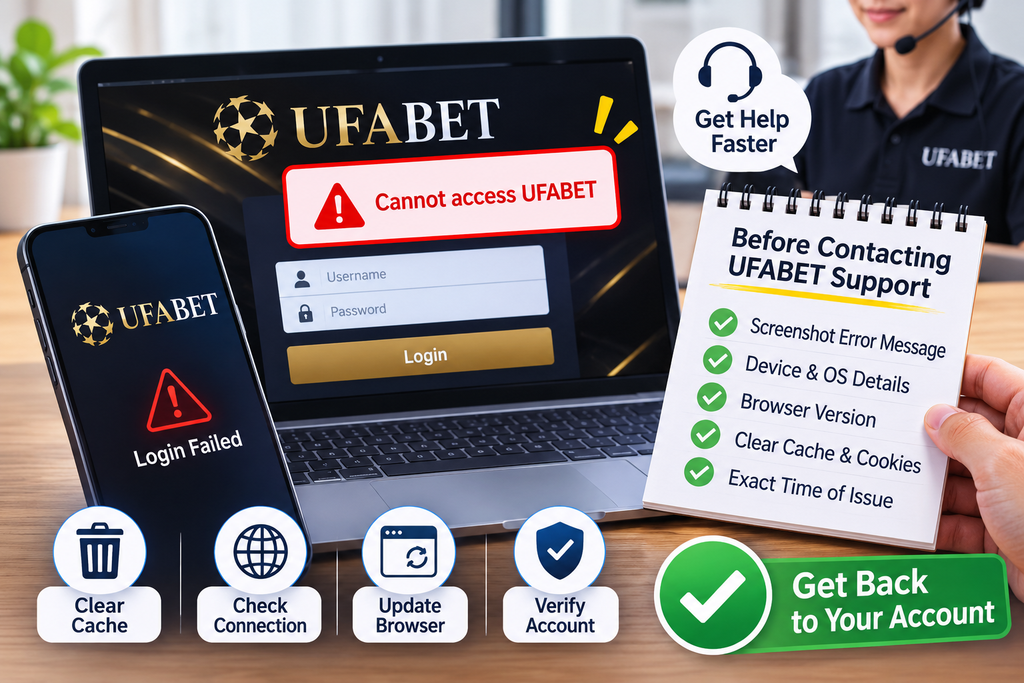
Many people feel worried when they Cannot access UFABET(เข้า UFABET ไม่ได้), especially right before a big live event. Studies in the field show that more than 70% of failed logins on mobile-friendly sites are fixed with simple steps. These steps include clearing the site’s cookies or moving from a busy public Wi-Fi to a faster 5G connection. To know if the problem comes from your phone or from the main server, you need to look at how browser storage works, how the IP address is seen, and how long the session lasts.
Step-by-Step Browser and Session Troubleshooting
Clearing your saved site data and then opening a private browsing window almost always fixes most login issues in browsers. When you go back to a member portal many times, your browser saves things like scripts, images, and login cookies. This helps pages load fast later. But if the platform updates its security or changes some links to help the servers, your old files on your device may not match the new files on the server. This can make pages go blank or keep sending you in a circle without logging in.
Follow these steps on your computer and your phone’s browser:
- Test in Incognito or Private Mode: Open a new private window by pressing Ctrl+Shift+N if you use Windows, Command+Shift+N for macOS, or open a Private Tab if you use Safari or Chrome on your phone. A private session will not use old cookies or browser extensions. This helps you see fast if stored data keeps you from logging in.
- Clear Site-Specific Cookies and Cache: Go to the privacy settings in your browser and pick “Clear browsing data.” Remove cached pictures and cookies from the last 24 hours. This action will reset the way your session works.
- Turn Off Conflicting Extensions: Things like ad blockers and privacy plugins may block needed login details during form fills. Try to switch off these add-ons.
- Check Your Inputs: Be sure Caps Lock is not on. Make sure your keyboard matches the needed layout when you signed up. Remove any extra spaces that got in when you copied from a password manager.
The design behind UFABET works well on Chrome, Safari, Edge, and Firefox. You do not need to install anything big on your computer to use it. If you keep your system and browser up to date, you get the best use of it. This helps things like secure logins and passkeys work the right way.
Resolving Connectivity, DNS, and Mobile Compatibility Issues
Switching network protocols and turning off active VPNs can get rid of timeout issues and stop automatic IP security blocks. Mobile devices often switch between cellular data and Wi-Fi, so your external IP address can change while you are using the device. Automated fraud-prevention firewalls notice when your IP address jumps to a new place fast, and they may think this is a sign of someone trying to steal login details. This makes them block login requests for a short time.
| Diagnostic Area | Desktop Fix | Mobile Fix (iOS & Android) | Expected Resolution Time |
| Network Routing | Restart router; switch Ethernet/Wi-Fi | Toggle Airplane Mode on for 15 seconds | Under 30 seconds |
| DNS Resolution | Flush DNS (ipconfig /flushdns) | Switch to 1.1.1.1 or 8.8.8.8 private DNS | 1–2 minutes |
| IP Filtering | Disable desktop VPN or proxy clients | Turn off cellular VPN apps or iCloud Private Relay | Immediate |
| App/Web Engine | Update browser to the latest stable build | Enable Low-Data Mode or close background apps | 1–3 minutes |
When travelers or people who commute say that they can’t open UFABET inaccessible(UFABET เข้าไม่ได้) during busy evening hours, it is usually because of problems with ISP-level DNS caching or too much traffic in that area. Also, there can be trouble for those who use phones or tablets with low memory. This can cause slow JavaScript on two-step sign-ins. If you close music or video apps running in the background, you can free up memory. This helps hardware sign-in like Face ID or using your finger to unlock to finish without stopping or running out of time.
Official Login Help, Security Checks, and Account Recovery
Use the built-in “Forgot Password” SMS tool or reach out to the approved customer support if you can’t get in after three tries. If you try to guess your password many times, it can set off short lockouts. These are put in to stop people from trying to break in by guessing your password.
Before you enter any recovery info, look at the browser’s address bar. Make sure the site spelling is right and that it is protected by an SSL certificate (https://). Many copycat phishing pages try to look like the real page to steal your login info.
To recover a locked or forgotten account safely:
- Start SMS OTP Reset: Click the password recovery link you see on the member login screen. A one-time code that works for a short time will be sent to your phone.
- Check Phone Signal: If you do not get the SMS code fast, make sure your phone is not set to Do Not Disturb. See if you have good signal with your provider, and wait one minute before asking to send the code again.
- Make a Strong Password: Use big and small letters, numbers, and symbols when you make a new password. Do not use a password you used on any other website.
- Get Help from Support: You can ask for help on the website’s Contact page, the phone desk, or the LINE Official Account. Tell them your device type, which browser you used, and the exact time of the problem. Never share your password or the OTP with anyone in support.
By using multi-factor authentication with around-the-clock member help, UFABET keeps your account safe. At the same time, the team makes sure real members get back into their dashboard fast.
Conclusion
Fixing sign-in problems often means you need to check things one by one. Start by making sure you are using the real HTTPS link. Then clear the old cookies from your web browser. Try not to use a VPN so your internet connection stays steady. If your login details do not work, use the official OTP recovery. The sign-in system on UFABET works fast on your phone using HTML5, but it also has strong security to keep people safe. So, most of the time, when you cannot get in, it is just for your safety. It is not a lasting problem with your account. If you remember these simple steps, you will be able to solve troubleshooting UFABET access issues(แก้ปัญหา UFABET) fast and get back to your dashboard with no trouble.
Frequently Asked Questions (FAQs)
Why does my login page keep refreshing without logging me in?
This often happens when your browser uses an old session cookie. To fix this, you can clear your browser cache and cookies. You could also try to open a new incognito window. This helps your browser start a fresh connection to the site.
Can I log in to UFABET on both my desktop and mobile phone?
Yes, the HTML5 platform works well on Windows, macOS, iOS, and Android browsers. So, you can sign in on your desktop and your mobile phone. But if you try to log in at the same time on more than one device from different IP addresses, the older device will log out by itself for safety reasons.
Why is my VPN blocking me from signing in?
Commercial VPNs send your data through IPs that come from data centers. These IPs often move from one area to another. Security firewalls see these changes and think they are strange. This stops sign-in until you turn off the VPN and use your usual home or mobile connection.
What should I do if I no longer have my registered phone number for OTP recovery? You need to get in touch with customer support by going to the official website’s trusted support pages. They will ask you to prove who you are. Once this is done, support staff will help update your info, and you will get back into your account.

Jhon AJS, the creative mind behind Grammar Update, is an experienced blogger passionate about simplifying English grammar. He focuses on explaining confusing word vs word differences, grammar rules, punctuation, and sentence structure in a clear and practical way. Through easy to understand guides and examples, Jhon helps readers improve their writing and communicate with confidence. With years of blogging experience, he continues to share helpful insights that make learning grammar simple, useful, and accessible for everyone.